Posts

Best Resources for Web Application Tester

Today we are going to see some of the best resources for Web Application Tester or Simply Tester for Quality Assurance .To all manual Tester with your manual testing do learn Automation Testing so that it will increase your Efficiency and Keep you at your best in Testing. There are lot of Opportunity for Automation Tester to work and test Web application and Web Software at an alarming rate. Best Resources are point wise: You can use any Language whether Java,Csharp,Python, Ruby, Php,Perl etc. For the time being We are using Java so steps are as follows: Best Resources for Web Application Tester 1.Learn Java Basic from here some of the Best Resource and Use Eclipse Juno or above version. Some best Resources for Java : 1.  javatutorials.   2. Java Programs  3. Java from Oracle 2.Start Picking up Selenium from resource as below: Keep in Mind First Installation then start your testing if all is well then read step by step documentation so that if you are not ha...

List of Best Resources for Liferay Developer

1.These link will consist of a list of useful resource for Liferay Developer where they can take a quick overview and step by step ways to learn from a basic to multi stage and dynamic system,portal,ERP and lots more: https://www.liferay.com/documentation/liferay-portal/6.0/development/-/ai/resources-for-liferay-developers 2.These link will teach you step by step about Liferay development best practices: http://blog.trifork.com/2012/05/03/liferay-sdk-development-best-practices/ Have a look at two mentioned books to Liferay in Action and Portlets in Action. 3.A pdf for Liferay Portel Development:   liferay - book .googlecode.com/files/ liferay -portlet- development .pdf. 4.Liferay Projects using Maven: http://www.liferay.com/community/wiki/-/wiki/Main/m2e-liferay+Quick+Start+Tutorial?_36_pageResourcePrimKey=27836074 5.A nice article on Spring MVC portlet in Liferay: http://www.opensource-techblog.com/2012/09/spring-mvc-portlet-in-liferay.html 6.For Beginners have a watch ...

How To make A Simple Liferay Theme

Liferay themes in Actions: Just you have to follow simple steps in order to develop your basic Liferay Themes for Your Organization Steps are as follows: 1.Install Liferay and Eclipse IDE for your Projects. 2.Follow the steps for installing Liferay IDe in eclipse: http://www.liferay.com/community/wiki/-/wiki/Main/Liferay+IDE+Getting+Started+Tutorial 3.Go through these Documentations too: creating-liferay-them-7 4. File --> New --> Liferay Project --> Give project name --> Select Liferay Theme as the option then click on Finish. 5.Now you have your structure .You can create new folders under _diffs folders like image,js,html etc as per your needs. 6.Finally you have a basic theme. 7. As you must be already knowing that Eclipse has a window where you can see ant  commands, you can select the relevant ant commands to build and deploy the theme or create a WAR to be deployed on your server. You can refer this too: styling-liferay-creating-a-liferay-theme/

Liferay Service Partners in your Area to look up

Here is list of Some Service Partners of Liferay Near by you . 1. Permeance Technologies :                      Country in:  Australia Permeance Technologies is a software consultancy recognized nationally for its innovative  and creative end-to-end services to commercial and major government agencies. www.permeance.com.au 2. XTIVIA :                                                 Country in: US XTIVIA is a Certified Platinum Level Liferay Partner with more than 150 US based employees and the Largest Liferay Service Provider in the U.S.A. www.xtivia.com 3.Everis :                                                  Country in: Spain Everis is ...

Liferay In Action and Technology of the Year

Image
Liferay is an Open source Content Management System written in Java and distributed under GNU Lesser General Public License and other optional commercial licenses.It is an Powerful portal that provides corporate intranets and extranets services. Liferay In Action tells all about Liferay ,its Features,facts,Liferay project and products and community resources that can help a Liferay Developer to understand in Depth all about Liferay. Liferay is Java-based and have various features like: 1 . Multiple Programming Language extension : Multiple Programming plugins that means we can make use of our python,php,Ruby on rails skills too to make web-application more effective and powerful. 2. Security : Web application made by Liferay is more secure with more security provided in it with validations and various checkpoints. 3. Faster Access and Use time: Web application take very less second to executes and faster processing of feedbacks and responses. 4. Comes Wi...

Wizpert Consulting Services

Image
I am very much excited to help people through chat and solve their problem as early as i can .So finally a thanks to  Michael Weinberg   for a lovely concept and for nice opportunity to bridge the gap between students and experts. So i am an expert on Wizpert to solve problems related to programming on C,C++ and java with my keen knowledge in the languages and lets u know more. I have started this blog with a vision to help college students to solve their problem in making practical files,learn their languages with beautiful examples on particular language and concepts. So you call me or  chat with me.

TIME MATERIALS FOR CAT PREPARATION

 IF YOU HAVE FOLLOWING THEN WRITE UP IN COMMENT SECTION FOR DISCUSSION AND HELP THE STUDENT IN CLEARING THEIR CAT AND PLACEMENT PAPER. TIME 2009 CAT PREPARATION MATERIAL FOR SALE TIME 2010 CAT PREPARATION MATERIAL FOR SALE TIME 2011 CAT PREPARATION MATERIAL FOR SALE The contents of the material are:- Stage 1 Lot 1+2 of Study material BASIC STUDY MATERIAL 1. Quantitative Ability I(With solution booklet) 2. Quantitative Ability II (With Solution Booklet) 3. Verbal Ability I 4. Verbal Ability II (English Grammer & Sentence Correction) 5. Verbal Ability III ( English Vocabulary) 6. Data Sufficiency 7. Reading Comprehension (A separate book) 8. Speed Enhancement Tricks and Tests 9. Cue Cards (around 200 cards with 40 words on each card, For vocabulary enhancement, Playing cards sized cards which u can carry along anywhere you go and increase your vocabulary) Practice Exercise Books 1. Quantitative Ability 2. Verbal Ability 3. Reading Comprehentions 4....

VIRTUAL TECH. PLACEMENT in GATES'12

Image
Gates is the annual Cultural, literary, technical and Management Fest of Guru Tegh Bahadur Intitute Of Technology which is a college affiliated to GGSIPU, New delhi. It will be organised from 27th march 2012 to 29th march 2012. The important thing is the concert by Hunny Singh(INDIA's best Rapper) is on 29th of march. INTRODUCTION To The EVENT: Virtual Tech Placement is a real life experience of a placement to test your knowledge and skills in every field from computers to managements. It is basically an event which shows your in depth knowledge of your core subject and communications skills at Group discussion and personal interview.This is an excellent opportunity for all to test themselves and win some attractive prizes as well! "Let the light enlighten the engineers".An event for which you do or die. The event has three rounds: 1.Aptitude round: In this round 30 MCQ based on c,c++ and aptitude are given to the candidate to solve and top ...

mouseevent in java

-program based on mouseevent in  java----- - import java.awt.*; import java.awt.event.*; import java.applet.*; /* <applet code="mouse" width=600 height=500> </applet> */ public class mouse extends Applet implements MouseListener,MouseMotionListener { int X=10,Y=50; String msg="MouseEvents"; public void init() { addMouseListener(this); addMouseMotionListener(this); setBackground(Color.yellow); setForeground(Color.red); } public void mouseEntered(MouseEvent m) { setBackground(Color.blue); showStatus("Mouse Entered"); repaint(); } public void mouseExited(MouseEvent m) { setBackground(Color.black); showStatus("Mouse Exited"); repaint(); } public void mousePressed(MouseEvent m) { X=20; Y=40; msg="GTBIT"; setBackground(Color.pink); repaint(); } public void mouseReleased(MouseEvent m) { X=20; Y=40; msg="Engineering"; se...

paintbrush applet from jdk

Image
this applet was taken from java development kit to give a java developer an innovative idea.... an applet for paint brush: import java.awt.*; import java.applet.*; import java.util.Vector; public class DrawTest extends Applet {     public void init() { setLayout(new BorderLayout()); DrawPanel dp = new DrawPanel(); add("Center", dp); add("South",new DrawControls(dp));     }     public boolean handleEvent(Event e) { switch (e.id) {  case Event.WINDOW_DESTROY:    System.exit(0);    return true;  default:    return false; }     }     public static void main(String args[]) { Frame f = new Frame("DrawTest"); DrawTest drawTest = new DrawTest(); drawTest.init(); drawTest.start(); f.add("Center", drawTest); f.resize(300, 300); f.show();     } } class DrawPanel extends Panel {     public static final int LINES = 0;   ...

datagrampacket datagramsocket

Image
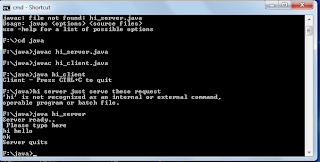
program based on client-server in java. server program save in one file: import java.net.*; class hi_server { public static DatagramSocket ds; public static byte buffer[]=new byte[1024]; public static void Myserver() throws Exception { int pos=0; while(true) { int c=System.in.read(); switch(c) { case -1: System.out.println("Server quits"); return; case '\r':break; case '\n':ds.send(new DatagramPacket(buffer,pos,InetAddress.getLocalHost(),777));           pos=0; break; default: buffer[pos++]=(byte) c; } } } public static void main(String args[]) throws Exception { System.out.println("Server ready..\n Please type here"); ds=new DatagramSocket(888); Myserver(); } } client program save in as different java file import java.net.*; class hi_client { public static DatagramSocket ds; public static byte buffer[]=new byte[1024]; public static v...

notepad in java

Image
//notepad or text-editor in java with source code import java.awt.*; import javax.swing.*; import java.awt.event.*; import java.io.*; import java.util.*; public class notepad extends JFrame implements ActionListener { MenuBar mbar; Menu file,edit,format,font,font1,font2; MenuItem itm1,itm2,itm3,itm4; MenuItem itm5,itm6,itm7,itm8,itm9,itm10; MenuItem fnam1,fnam2,fnam3,fnam4; MenuItem fstyle1,fstyle2,fstyle3,fstyle4; MenuItem fsize1,fsize2,fsize3,fsize4; JPanel mainpanel; TextArea text; Font f; String months[]={ "Jan","Feb","Mar","Apr", "May","Jun","Jul","Aug", "Sep","Oct","Nov","Dec"}; GregorianCalendar gcalendar; String command=" "; String str=" "; String str1=" ",str2=" ",str3=" "; String str4=" "; String str6=" "; String str7=" ",str8=" ",s...

url in java

To understand url-uniform resource locator operations in java just run this program ... import java.net.*; import java.io.*; class url { public static void main(String args[]) throws Exception {                URL p1=new URL("http://www.oracle.com:80/docs/path#up"); System.out.println("Protocol:"+p1.getProtocol()); System.out.println("Host :"+p1.getHost()); System.out.println("File Name :"+p1.getFile()); System.out.println("Port :"+p1.getPort()); System.out.println("Reference :"+p1.getRef()); } }

HAPPY DIWALI 2011

Image
Diwali is a traditional festivals that has been celebrated almost in all asian coountries like India,Myanmar,Malaysia,Sri lanka ,Nepal etc.It is festivals of lighting of clay lamps and seeing the beautiful glow of lights that is beauty of lights and an art of yours at  night that says from heart awsome,awsome and out of this world.....So i am not going to miss this day and enjoy it to the fullest with my family and friends..... Here just to say happy diwali to all my colleague and freinds...So i wish millions of lamps illuminate ur life with health,joy,prosperity,love,wealth and happiness forever and ever ..... Happy Diwali 2011 Happy Diwali 2011 itprofessionalsrocks.blogspot.com

GTBIT SQL QUERY

ITPROFESSIONALSROCKS.BLOGSPOT.COM ---2 QUESTION-- ·          Create a database named ‘ Employee’. ·          Use the database ‘Employee’ and create a table ‘Emp’ with attributes ‘ename’,’ecity’,’salary’,’enumber’,’eaddress’,’depttname’. ·          Create another table ‘Company’ with attributes ‘cname’,’ ccity’,’numberof emp’,’empnumber’ in the database ‘Employee’. create database employee use employee create table emp ( ename varchar(20),ecity varchar(20),salary float,enumber int,eaddres varchar(40),deptname varchar(20)); Create table  Company ( cname varchar(20), ccity varchar(20),numberofemp int,empnumber int ) insert into emp values('hemant','delhi',500000,98993142,'karol bagh','techsolution'); insert into emp values('rajiv','delhi',300000,99999234,'moti nagar','finanace'); insert into emp values('raji','delhi',300000,99999234,'moti nagar','manage...

JAVA PROGRAM 8

JAVA PROGRAM 8: Create 2 threads such that one of thread prints even nos. and another prints odd nos. up to 50. itprofessionalsrocks.blogspot.com class A extends Thread { public void run() {  System.out.println("even number from 1 to 50 are given below"); for (int i=1;i<=50;i++) { if(i%2==0) { System.out.println("\n"+i);   }   }   System.out.println("exit from thread a");   }   }   class B extends Thread   {   public void run()   {    System.out.println("odd number from 1 to 50 are given below ");   for(int i=1;i<=50;i++)   {if(i%2!=0)  {    System.out.println("\n"+i);   }   }   System.out.println("exit form thread b");   }   }     class thread     {     public static void main(String args[])     {     A threadA=new A();     B threadB=new B();     System.out.println("Start thread A");     th...

java program 7

java program 7: Create a user defined exception named “CheckArguments” to check the arguments passed through command line. If no of arguments are less than 5, throw the “CheckArgument” exception else print addition and avg. of all 5 nos. import java.lang.Exception; import java.util.Scanner; import java.io.*; class CheckArguments extends Exception { CheckArguments(String message) {super(message); } } class arguments { public static void main(String args[]) { int a,count=0,sum=0,avg; System.out.println("enter numbers") ; for(int i=0;i<args.length;i++) { a=Integer.parseInt(args[i]); count=count+1; sum=sum+a; } avg=sum/i; try { if(count<5) { throw new CheckArguments("Arguments are greater than 5"); }  else {     System.out.println(sum);     System.out.println(avg); }  } catch (CheckArguments e) {System.out.println("Caught the exception"); } finally { System.out.println("i am always here"); } } }

java program 6

java program 6: itprofessionalsrocks.blogspot.com  WAP to define an exception called "MarksOutOfBound" exception that is thrown if the marks are out of bound. import java.lang.Exception; import java.util.Scanner; import java.io.*; class MarksOutOfBound extends Exception { MarksOutOfBound(String message) {super(message); } } class marksexcep { public static void main(String args[]) { Scanner obj=new Scanner(System.in); int[] a=new int[6]; System.out.println("enter marks for five subjects") ; for(int i=0;i<5;i++) {a[i]=obj.nextInt(); try {if(a[i]>100) { throw new MarksOutOfBound("marks are out of bound"); } } catch (MarksOutOfBound e) {System.out.println("Caught the exception"); } } } }

java program 5:

java program 5: WAP to catch any 3 built in exceptions in java. class exception { public static void main(String args[]) { try { int a=args.length; System.out.println("a="+a); int b=42/a; try { int c[]={1}; c[42]=99; } catch(ArrayIndexOutOfBoundsException e) {System.out.println("Arrays index oob"+ e); } } catch(ArithmeticException e ) { System.out.println("divide by 0"+e); } catch(ArrayStoreException e) { System.out.println("Wrong data type"); }catch(Exception e) { System.out.println("recaught"+ e); } } }